CIP Administrative features are available through the Admin menu. Users need to be granted specific administrative role permissions to configure options.
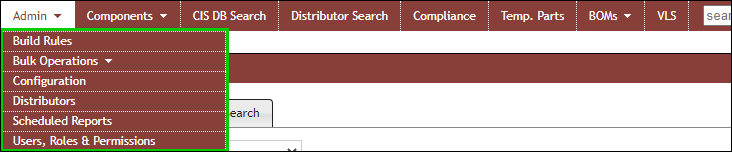
Admin Menu Items
The Admin menu enables access to the following admin options:
▪Build Rules – Set-up build rules for auto-build of part type and description
▪Bulk Operations
oBulk Delete parts in CIP from CSV
oBulk Rename parts in CIP from CSV
oComponent View Mover – Move parts between views within a table
oImport parts from CSV to CIP
oTMPPRTS Import
▪Configuration
oComponent Views, Customizable Fields, and Field Transfer Options
oReorder and Group View Fields
oBOM/Design Options for BOM Format and Design Parts Sync
oColor Indicator for Manufacturer Part Status
oSeparator selection for Import and Export files
oCIP Link setup (for viewing of CIP parts from CIS)
oConfigure Reuse Module Location
oUltra Librarian download options
oEnable Virtual Librarian Service (VLS) menu item and Manufacturer PN request button
oConfigure fields to be transferred to design
oShow link to active users on the log in page
▪Distributors – Distributors Administration
oAutomatic sync of data from distributors
oCountry settings and customer ID
▪Scheduled Reports – Create regularly scheduled exports of any saved Global Search
▪Users, Roles, & Permissions – Users, Roles & Permission Administration
oConfigure user specific notification
oConfigure field permissions for each role
Users who have partial administrative permissions can view only the list of options that are specifically granted to them. Conversely, a user without granted permission to the build rules option is unable to view those options. The figure that follows, for example, shows a view of the menu items that are available to an admin user who lacks privileges to the build rules. Refer to User Administrative Role Permissions for more info.
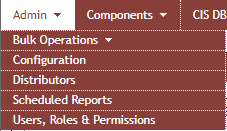
Admin Menu Items Without Privilege to Build Rules