Virtual Librarian Service (VLS) helps engineering teams create their own exclusive part libraries fast and accurately, allowing engineers to focus on innovation. To access VLS, click  from the CIP menu bar or click the
  button shown on a Manufacturer PN. If you do not have a VLS account or do not want to see its options, you may disable it.
To enable or disable Virtual Librarian Service (VLS),
1.Select the Admin > Configuration menu, then click the Other tab.
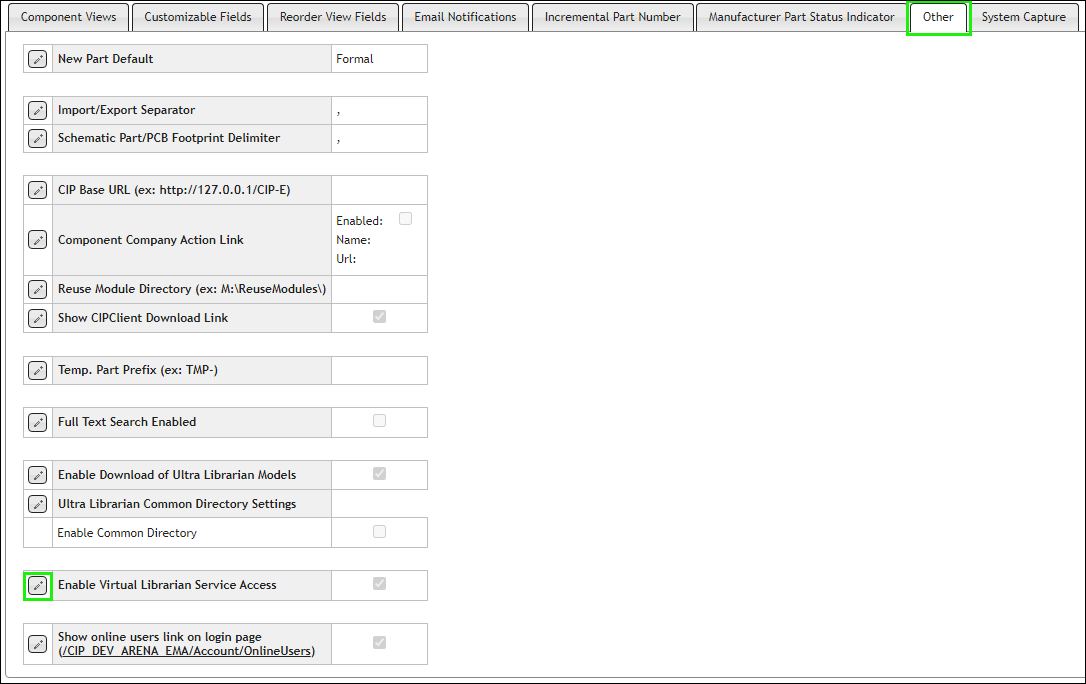
2.Select the Edit button  for Enable Virtual Librarian Service Access.
3.By default, the Virtual Librarian Service is enabled. Select the checkbox to change the setting for Enable Virtual Librarian Service Access and click the Save button  , or click Cancel
  to discard changes.

When enabled or disabled, this setting applies to VLS menu item and the VLS button shown on a Manufacturer PN within CIP for all users. It will only be shown when it is enabled in the configuration (shown below) and when you are logged into an Ultra Librarian account that has VLS access..