The CIP Client is a separate installation that adds features for OrCAD Capture CIS or System Capture users when the corresponding plugin is installed. Client plugins for all supported SPB versions are included in the download. For SPB 23.1 or 24.1, the System Capture client plugin is included.
The CIP Client enables a user to open CIP from OrCAD or System Capture and use all the standard features of CIP as well as preview/place symbols, preview footprints, compare symbols to footprints, create/import reuse modules, and import BOMs directly into CIP. *Some client features required OrCAD Capture and are not supported in System Capture.
Users who also have Library Builder installed on their system, can launch Library Builder from CIP to build symbols and footprints.
Note: Users who are granted permission to configure customizable fields are also granted permission to enable the Show CIPClient Download Link.
To enable the CIPClient Download Link
1.Select the Admin > Configuration menu, then click the Other tab.
2.Select the Edit button  for Show CIPClient Download Link.
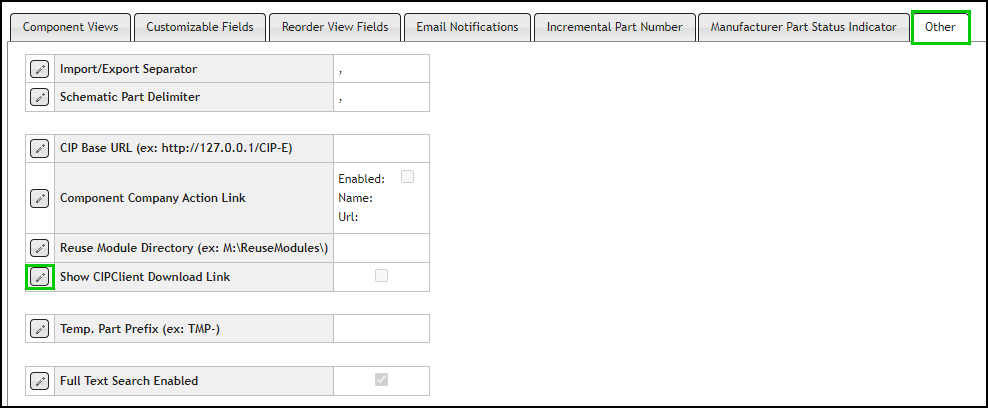
Edit Show CIP Client Download Link
3.Select the checkbox for Show CIPClient Download Link and click the Save button  , or click Cancel
  to discard changes.
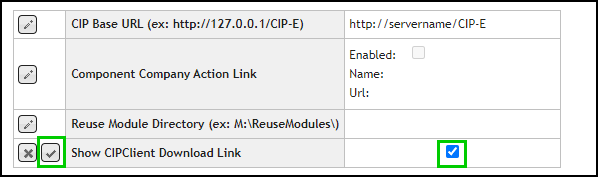
Save Configuration Setting for Show CIP Download Link
After making this change, the Download CIPClient link appears when you refresh the page. The download link will be available from the landing/home page before logging in, and from any CIP page when logged in.
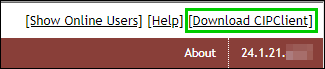
CIPClient Link on CIP Landing/Login Page

CIPClient Link on any CIP Page when Logged In
To download the CIP client, open CIP from a standard browser and click the Download CIPClient link.