The Admin > Bulk Operations menu allows you to perform the operations shown below. Only users belonging to a user role with Bulk Operations permission will be allowed to access these features.
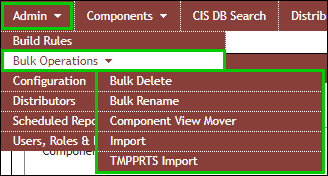
Admin > Bulk Operations
These options enable you to process the following routine bulk operations:
▪Bulk Delete – Delete specified parts and/or their associated Manufacturer/Manufacturer PN and Distributor/Distributor PN pairs from a Comma Separated Value (CSV) file.
▪Bulk Rename – Rename specified part numbers to new part numbers from a Comma Separated Value (CSV) file.
▪Component View Mover – Move parts from one component view to another view that is associated to the same table.
▪Import – Add parts or Update existing part properties from a Comma Separated Value (CSV) file.
▪TMPPRTS Import – Import TMP part (TMPPRT) associations when migrating data from a non-CIP CIS database into your CIP/CIS database. This is required to migrate existing and converted TMP parts and will allow them to be properly associated in CIS Part Manager.