The Value field used in Capture can represent the part number or an actual value of a discrete component. When you search for values in discrete components views (i.e. capacitors, resistors, inductors and crystals and oscillators), you can conduct a search using numeric comparison operators that include the following:
▪Equals (=)
▪Does Not Equal (!=)
▪Greater Than (>)
▪Greater Than or Equal (>=)
▪Less Than (<)
▪Less Than or Equal (<=)
Note: If you do not see these options, consult your database administrator about installing the Smart Value CLR option to the database. The Smart Value CLR feature is not supported by AWS RDS server. If your database is installed on AWS RDS, this functionality will not work.
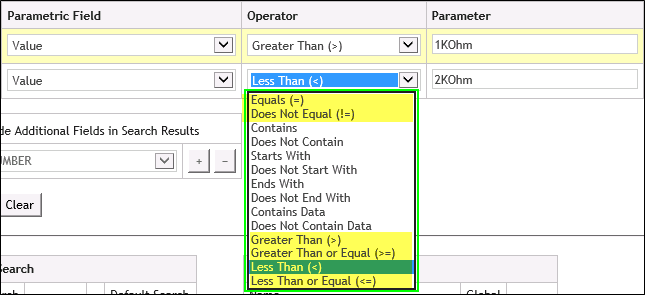
Defining Numeric Criteria to Filter Search Results
When using one of these criteria, the search algorithm automatically applies the following SI units:
p |
pico |
n |
nano |
u |
micro |
m |
milli |
K |
Kilo |
M |
Mega |
When a numeric comparison Operator (<, <=, >, >=) is selected when searching other Parametric FIelds, CIP will automatically attempt to convert the selected Parametric Fields to float/number type when performing the search.